
Secrets and environment
Teflon keeps two kinds of configuration apart, and the difference is whether the value is a credential.
Secrets are API keys, database URLs, and private keys.
They are stored encrypted server-side and are write-only: no command and no page ever shows you a value again.
Plain environment variables are log levels, feature flags, and region names.
Their values are shown by teflon env list and are visible in the app's spec, so anything sensitive belongs in a secret instead.
One container means one namespace: a name cannot be both a plain env var and a secret binding, and teflon rejects either direction.
Kubernetes gives a container's own env entries precedence over a secret reference, so a plain value on a bound name would silently shadow the credential.
Secrets
Create or overwrite a secret by name. Overwriting bumps its version, and every app bound to it rolls out with zero downtime automatically.
# Hidden prompt - the best option at a terminal, since nothing lands in your shell history
# Piped stdin, for files and password managers
|
# Positional value, for scripts and command substitution
# Several at once as NAME=VALUE pairs, stored together so a bound app restarts once
Names follow the C-identifier grammar [A-Za-z_][A-Za-z0-9_]*, at most 255 characters: letters, digits, and underscores, not starting with a digit.
A hyphen is not allowed, so my-api-key is rejected and MY_API_KEY is the shape to use.
Values are capped at 64 KiB, and per-user secret and per-app binding quotas are enforced server-side.
Listing shows metadata only.
$
NAME VERSION UPDATED BOUND APPS
PROD_API_KEY 2 2026-08-07T02:29:59.707269Z my-app
DATABASE_URL 1 2026-08-07T02:29:54.17204Z my-app
teflon secret get NAME shows one secret the same way, with the age of its last set, so a rotation is easy to verify.
$
NAME PROD_API_KEY
VERSION 2
UPDATED 2026-08-07T02:29:59.707269Z (3d ago)
CREATED 2026-08-04T18:12:03.51928Z
BOUND APPS my-app
Deleting a secret that is still bound is refused outright, and the error names the applications holding it, so you unbind before you delete rather than after.
$
× delete secret request failed
╰─▶ code: 'The system is not in a state required for the operation's
execution', message: "secret 'DATABASE_URL' is still bound to: my-app;
unbind it before deleting"
Binding secrets into an app
A secret does nothing until it is bound to an env var your app reads.
Each binding is ENV=NAME: the env var on the left, the secret that fills it on the right.
Both sides are always explicit, even when they are the same word.
teflon secret bind is declarative.
The set you pass replaces the app's bindings entirely, so list every binding the app should have.
A binding change rolls the app on its own: the control plane re-renders the Deployment and the new pod starts with the new env.
The same is true when teflon secret set overwrites a bound secret.
Setting several NAME=VALUE pairs in one call stores them together, so an app bound to more than one of them rolls once, not once per secret.
No redeploy is needed, and teflon secret bindings shows the version each binding is on and how long ago that secret was last set.
$
ENV SECRET NAME VERSION UPDATED
API_KEY PROD_API_KEY 2 3d ago
DATABASE_URL DATABASE_URL 1 12d ago
Who can read a bound secret
Your app reads a bound secret from its environment, so whoever controls the app's code controls the secret. Any user who can deploy code and read logs has read access to all of the app's bound secret values at runtime. That includes every admin of the app. Only the owner can bind secrets, and teflon never shows a value back, but those limits cover the management commands only. They do not stop deployed code from printing or sending its own environment. Only make someone an admin if you would trust them with every secret bound to the app.
When the app changes owner
Secrets belong to a person, not to an app, so when the app is handed to someone else, each secret it binds is copied into the new owner's account and the app binds the copies.
It keeps every value; the person who handed it over keeps their own secrets.
The new owner's existing secrets are never bound for them, even ones with the same names: a copy that would clash is numbered instead, like API_KEY_2.
Environment variables
teflon env set adds or updates the vars you pass and leaves the rest alone.
Each var is NAME=VALUE, split on the first = only, so the value may itself contain =.
Pass --replace to make the given set the app's complete env: every var not listed is removed.
$
NAME VALUE UPDATED
FEATURE_X on 2026-08-07T02:29:54.371638Z
LOG_LEVEL debug 2026-08-07T02:29:54.371638Z
teflon env unset is the selective option and reports how many vars it actually removed; a name that was not set is ignored rather than an error.
Like bindings, env var changes roll the app immediately; there is nothing to redeploy.
PORT is reserved.
Teflon sets it from the app's --port, so setting it here is rejected.
An app with a database also cannot set the names that database provides, such as PSQL_URL; apps without one can.
DATABASE_URL is not one of them, so a framework that only reads it can alias the database's URL, as the databases page shows.
If DATABASE_URL is bound to a secret, unbind it first, because one name cannot be both.
Setting config during a deploy
secret bind replaces; env set and the deploy flags merge.
A plain teflon deploy never drops a binding or an env var.
The deploy flags are also the non-interactive route for scripts and agents: --secret-literal ENV=VALUE stores and binds in one step, and --set-secret ENV=NAME binds a secret that already exists, with no prompt either way.
| Flag | Effect |
|---|---|
--set-secret ENV=NAME | Bind the existing secret NAME as the env var ENV; merges |
--secret-literal ENV=VALUE | Create or update a secret named ENV with VALUE, then bind it as ENV; merges |
--remove-secret ENV | Unbind whatever is bound as ENV; the secret itself is not deleted |
--set-env ENV=VALUE | Set the plain env var ENV; merges |
--remove-env ENV | Delete the plain env var ENV |
All five are repeatable, and removing a name that is not there is a no-op rather than an error.
They are also owner-session-only: a GitHub Actions deploy authenticating with a CI token is refused any of these flags, so configuration is always set by a person and CI only ships code.
Deploy-time configuration is scoped to the release it was submitted with.
Names are validated immediately, so an unknown --set-secret fails the deploy before anything is built, but nothing is applied until that build's image goes live, in the same atomic step.
The version running right now therefore never receives credentials meant for the version being built.
A build that fails applies nothing at all, and neither does one a newer deploy has already superseded: newest wins, so the older build's image is recorded but never activated, and its staged configuration is dropped along with it rather than landing on a different build's running image.
A note on AI agents
Never paste a secret value into a chat with an agent.
Have the agent write command substitution instead - --secret-literal KEY="$(op read op://vault/item/field)" - so your shell expands the value after the model has written the command, and the plaintext never enters the model's context.
For a value that exists only in your head, have the agent ask you to run teflon secret set NAME yourself: the hidden prompt puts nothing in the transcript.
In the console
The Secrets page lists your secrets with their versions and bound apps; the Create a secret button opens a dedicated page to add or overwrite one.
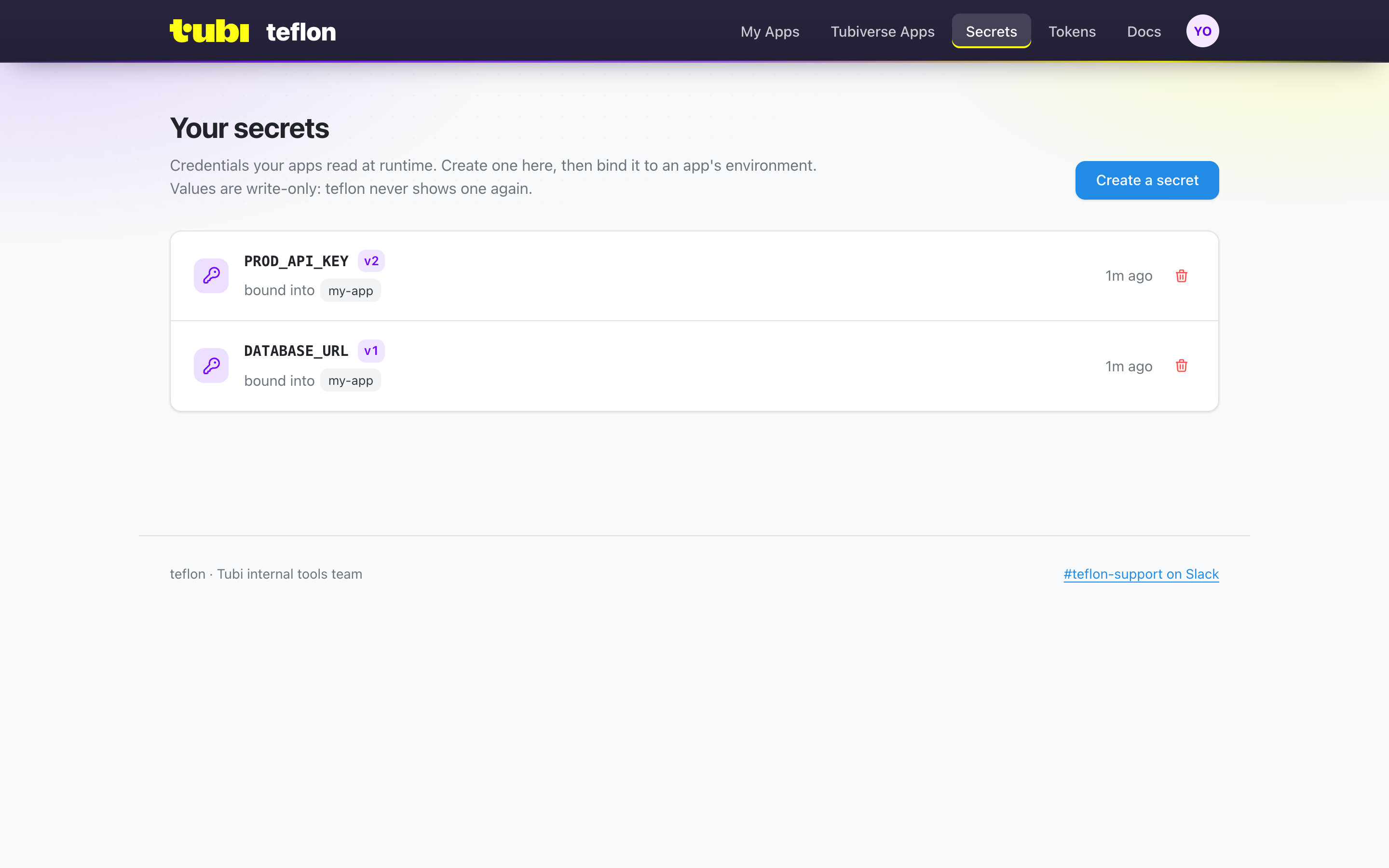
Values are write-only here too: the page can set a secret and never show one.
Each app has its own configuration page, reached from the Edit configuration button on the app's Overview tab, with Environment variables above and Secret bindings below.
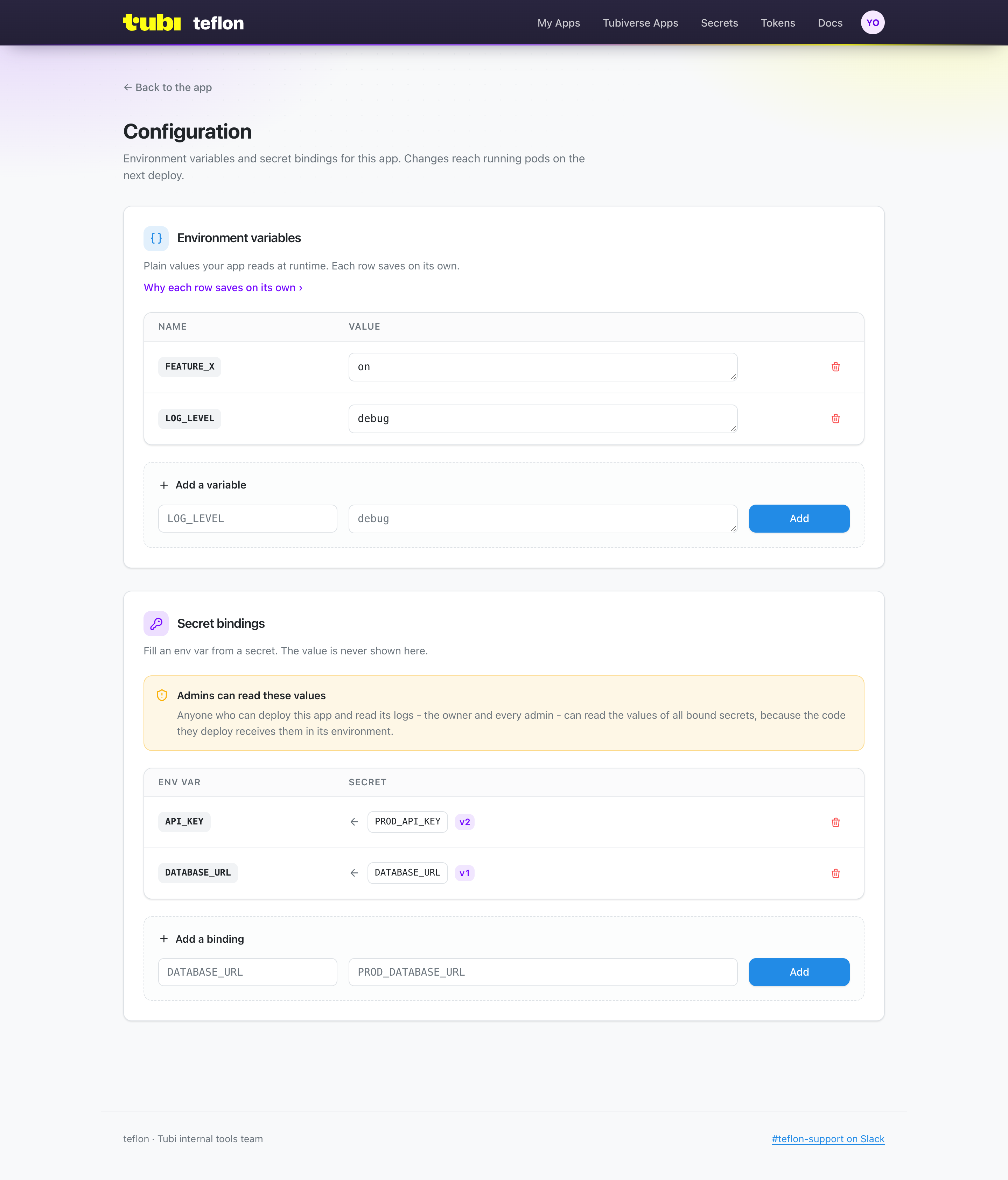
Each row there saves on its own, so two people editing at the same time cannot undo each other.
That matches the CLI's env set, which also leaves unmentioned vars alone, but differs from secret bind, which replaces the whole binding set.