
Getting started
Teflon takes a directory of source code and gives you back a live URL.
You point the CLI at a folder, tell it which port your app listens on, and a minute or two later https://<your-app>.tf.int.tubi.io is serving traffic over TLS behind Google SSO.
There is no Dockerfile to write, no Kubernetes manifest to maintain, and no AWS console to visit.
There is no project config file either: everything a deploy needs comes from flags on the command line.
Authenticated requests arrive at your container with X-Auth-Request-Email and X-Auth-Request-User headers set, so your app knows who the user is without implementing any auth of its own.
Install the CLI
Open https://tf.int.tubi.io and paste the one-line command the homepage shows you.
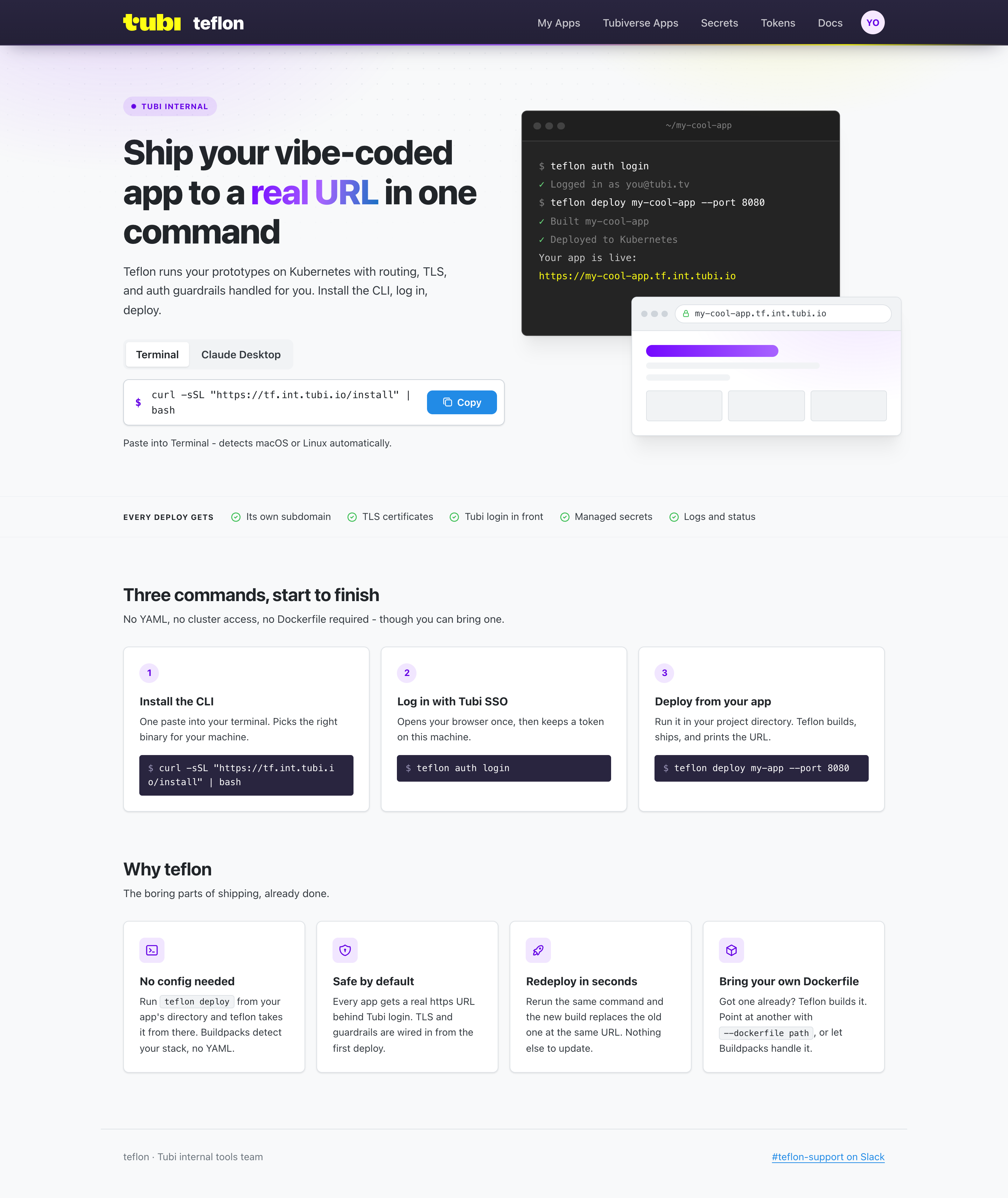
The command is the same for everyone and carries no credentials, so it is safe to keep in a setup script. It detects macOS or Linux and installs the right binary.
If you would rather build from source, cargo install --path teflon-cli from a checkout of the repo installs the same binary, named teflon.
Log in
The CLI opens your browser at the control plane's login page, the control plane runs the Google SSO flow, and the resulting access token comes back to the CLI.
The token is good for 24 hours and is stored in your OS keychain, with a 0600 file under ~/.config/teflon/ as a fallback.
After upgrading teflon on macOS, the first command that touches the keychain pops a one-time approval dialog; click Always Allow.
If an agent is driving the CLI and reports a hang, that dialog is why: see Auth and tokens for the fallback.
You rarely need to run it by hand: any command that needs auth notices the missing or expired token and opens the browser login for you first, then runs the command you asked for.
The one exception is teflon auth whoami, which is read-only and never opens a browser.
With no live token it prints not logged in (or the stored token expired) and exits with code 3, so an agent can probe with whoami and, on exit 3, hand off to a human to run teflon auth login.
Check who you are, and when that token runs out:
$
EMAIL you@tubi.tv
NAME Your Name
USER ID 28db564a-f471-4123-a266-7a38eeac9070
MEMBER SINCE Friday, August 07, 2026 at 2:14am
TOKEN EXPIRES Saturday, August 08, 2026 at 2:18am
Your first deploy
Deploy uploads the whole directory, filtered by .dockerignore - .gitignore is not consulted.
Local toolchain scratch directories are dropped for you at any depth, even with no .dockerignore: .venv/, node_modules/, __pycache__/, target/, _build/, deps/, .gradle/, .idea/, and the like.
Build outputs such as dist/ or build/ are kept, since a Dockerfile may COPY them.
A .env file is kept too, and teflon deploy prints a note when one is in the archive; add it to .dockerignore unless your Dockerfile needs it.
Then change into the directory you want to ship and deploy it.
$
$
✔ Archiving Source
✔ Registering Build
✔ Uploading Source Code
✔ Scanning Code for Vulnerabilities
✔ Building Docker Image
✔ Starting Application
ID 0fce8167-11a7-4504-b04e-ecb41b81d844
BUILDER dockerfile
URL https://my-app.tf.int.tubi.io/
The progress checklist is drawn on stderr, so piping stdout somewhere still gets you clean output.
The build id in the result is what teflon deploy status takes if you want to look at this build again later.
Behind those six steps, teflon archives your directory (honoring .dockerignore, not .gitignore) and uploads it, scans the source for leaked secrets and critical dependency vulnerabilities, builds an image in the cluster, rolls out a Deployment and Service, and waits until the app is actually serving.
Your machine never runs Docker.
A scan that finds a leaked credential or a fixable critical vulnerability fails the deploy and prints exactly what to fix; see Deploying.
Your app is now live at https://my-app.tf.int.tubi.io.
New apps are private, so only you (and any admins you grant) can open it at first.
The first successful deploy of each app ends with a note linking its console page, https://tf.int.tubi.io/apps/my-app, where you can make it public to everyone with a Tubi login or add individual people to its allow list.
Verifying a deploy without a browser
Every app URL sits behind SSO, so a plain curl gets a 401 on every path, including /health.
That is the gateway, not your app.
To call the app from a script or an agent, mint a token scoped to it and send it as a Bearer:
TOKEN=
The token value is the only thing on stdout, whatever -o resolves to, so the substitution captures it cleanly.
A token minted for one app is a 403 at any other app's host.
See Auth and tokens for the details.
See it in the console
Everything the CLI shows you is also in the web console, starting with the My Apps list.
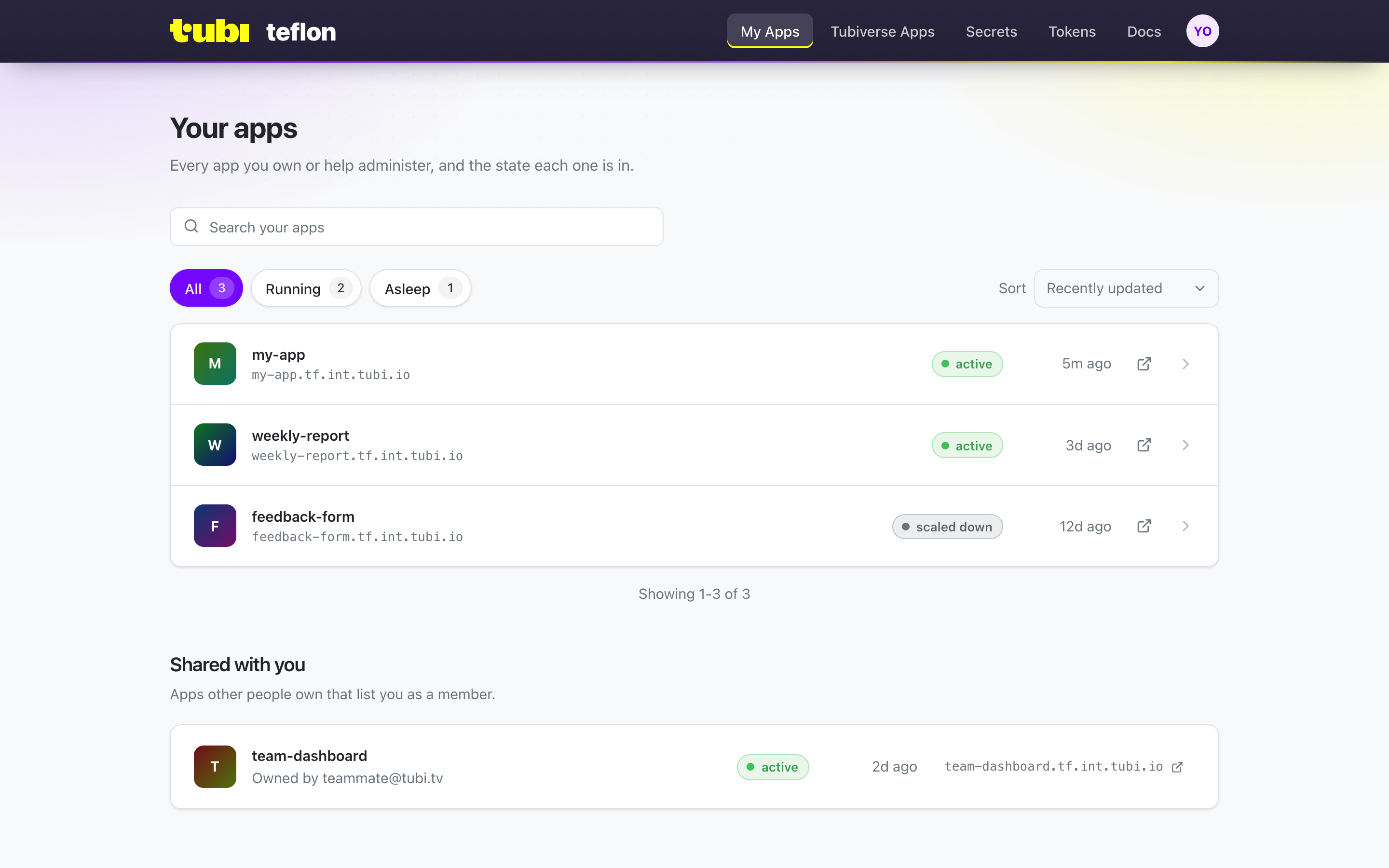
Click an app to get its status, build history, recent logs, environment variables, and secret bindings on its Overview tab.
Where to go next
- Deploying covers the deploy flags, builders, the security scan, deploying from GitHub Actions, and how to watch a build.
- Finding things covers listing apps, reading logs, browsing everyone's apps on Tubiverse Apps, and looking up an app by name, slug, or id.
- Secrets and environment covers credentials and configuration.
- Auth and tokens covers API tokens for scripts and agents.
- Webhooks covers letting a vendor such as DocuSign call your app, and how the OAuth token behind it works.
- Databases covers giving an app its own Postgres, MySQL, or Redis, and what happens to its data.
- Maintenance covers updating the CLI, quarantined apps, volumes, deletion, and where to ask for help.