
Deploying
One command deploys a directory.
The first argument is the friendly name of the app, created on the first deploy and reused on every one after.
--port is the port your process listens on inside the container.
Both are required the first time; after that, teflon.toml remembers them (see below).
--port is required even for a batch or cron-style workload; see Developing apps for the pattern.
Redeploying is teflon deploy from the same directory, with no flags.
Deploying with a name you already own updates that app in place, whatever --path you pass: a new source directory replaces the running app, it never creates a second one.
The app's secret bindings, env vars, and volume carry over on every redeploy; only the code changes unless you pass config flags too.
App names are per-user: deploying to a slug someone else owns is an error, never a takeover - unless the owner has made you an admin of that app, in which case your deploy updates it.
The flags you will actually use
| Flag | What it does |
|---|---|
<APP_NAME> | Friendly application name; created on first deploy |
--port <PORT> | The port the app listens on |
--path <DIR> | Source directory to deploy, relative or absolute, defaulting to . |
--dockerfile <PATH> | Path to the Dockerfile, relative to --path; forces the Dockerfile builder |
--builder <BUILDER> | Force dockerfile or buildpacks instead of auto-detecting |
--detach | Return the build id immediately instead of waiting |
--force | Archive even when --path looks like your home directory or holds more than 50,000 files |
--idle-timeout <DURATION> | How long the app may go without traffic before it is put to sleep, from 1h to 7d, defaulting to 24h |
--view <concise|detailed> | Which columns to show for the finished build, in pretty output |
--path can be absolute, so a deploy does not have to run from inside the source tree.
Deploy also carries secret and environment configuration along with the build: --set-secret, --secret-literal, --remove-secret, --set-env, and --remove-env.
Those flags merge into what the app already has rather than replacing it, and they are covered in Secrets and environment.
Persistent storage is attached at deploy time with --volume-size and --volume-mount; see Maintenance for what a volume costs you and how to remove one.
For a database, skip the volume and use teflon db create; see Databases.
An app that gets no traffic for its whole idle timeout is put to sleep until the next visit; see Sleeping apps.
Unlike the name and port, --idle-timeout is not remembered: a deploy without it puts the app back on 24 hours.
teflon.toml remembers the target
Once the server accepts a deploy, the CLI writes the name, port, and any --builder or --dockerfile you passed to teflon.toml at the source root, and prints saved deploy defaults to teflon.toml when it does.
The next teflon deploy from that directory reads them back, so a redeploy needs no flags.
= "my-app"
= 8080
Flags always win over the file, and the file follows whatever was actually deployed. Commit it if you want everyone who clones the repo to deploy to the same app.
You can also add a blurb to the file, which is the line under your app's name on Tubiverse Apps (see "Describe your app" below).
The CLI never writes that key for you, and keeps it when it rewrites the file.
= "my-app"
= 8080
= "Tracks weekly ad revenue by partner"
Deploying under a name you do not own yet creates a second app at a second URL.
When that name is within a couple of characters of one of your apps, or teflon.toml names a different app, the CLI says this will create a NEW app 'x', not update 'y' and asks first.
Off a terminal, pass --yes to confirm.
Describe your app
Every card on Tubiverse Apps can carry a one-line blurb under the app's name that says what the app is for. A blurb is at most 140 characters. The text you write is shown instead of any that was written for the app before.
There are two ways to set it:
- Add
blurb = "..."toteflon.toml. The next deploy sets it, including a deploy from GitHub Actions. - Run
teflon app blurb set my-app "Tracks weekly ad revenue by partner"at any time, as the app's owner, an app admin, or a teflon admin.
To store a longer description with it, such as your README, add --description-file README.md to teflon app blurb set.
The file must be UTF-8 text of at most 1 MiB, and the card still shows only the blurb.
A deploy never sends the description file.
teflon app blurb remove my-app takes your blurb back off, and the card then shows whatever was there before, or nothing.
A blurb that is too long is refused before anything is sent.
Tag your app
Tags are the labels on a card on Tubiverse Apps, and what people filter the page by. An app wears at most four, chosen from one shared list that includes the Hackathon 2026 event. You cannot add to the list. Until you choose, the tags are the ones the platform generates for the app.
You can choose them on the app's page, under Tags: click a tag to pick it, and click a picked one to drop it. Only the app's owner and its admins see it there. The same rules apply as below.
Or from the command line. Run teflon tags list to see what you can pick from. Then, as the app's owner, an app admin, or a teflon admin, set the app's tags:
teflon app tags set my-app dashboard hackathon-2026
This replaces every tag the app wears now, so name all the ones you want.
Once you have set them they are yours: the platform stops changing the app's tags, on later deploys too.
teflon app tags set my-app --none leaves the app with no tags.
More than four tags, or the same tag twice, is refused before anything is sent.
How builds work
Your machine never runs Docker.
The CLI archives the source directory, honoring .dockerignore and deliberately not .gitignore, and uploads the tarball.
The build itself happens in the cluster.
Because .gitignore is not consulted, the CLI drops local toolchain scratch directories itself, at any depth: .venv/, venv/, __pycache__/, .pytest_cache/, node_modules/, target/, _build/, deps/, .gradle/, .idea/, .vscode/, .cache/, and similar.
Build outputs a Dockerfile may COPY (dist/, build/, Go's vendor/) are never dropped; exclude those in .dockerignore if you do not want them uploaded.
A .env file is kept for the same reason, and the CLI prints a note naming it before the upload.
Which builder runs is decided for you:
--dockerfile <path>forces the Dockerfile builder, and errors if that file does not exist.- Otherwise a
Dockerfileat the source root means the Dockerfile builder. - No
Dockerfilemeans Cloud Native Buildpacks, which detect your language and build an image without one.
--builder dockerfile or --builder buildpacks overrides the detection when you want the other one.
If the build fails you get the reason inline, plus a builder-specific hint - for a Dockerfile build, to check that docker build . works locally first.
Buildpacks have failed with build succeeded but no image digest was reported on heavy Python ML images (Prophet, Stan, large torch installs) and on some first-time Node deploys.
When that happens, add a Dockerfile and deploy with --builder dockerfile.
If the image builds but the container crashes on startup, the CLI exits non-zero and prints the last 50 log lines so the reason is in front of you already.
Every build is scanned
Before the image is built, the uploaded source is scanned, and two gates can fail the build:
- Leaked secrets. A critical- or high-severity credential in the source - an API key in a config file, a private key committed by mistake - fails the build.
The output lists each finding as
file:linewith what was found; remove the credential from the code, rotate it (it has been in an uploaded archive, so treat it as exposed), and deploy again. - Critical dependency vulnerabilities with fixes available. A dependency with a known critical CVE that has a fixed version published fails the build. The output lists the lockfile, the package, the installed and fixed versions, and the CVE id; update the flagged dependencies and deploy again.
Vulnerabilities without a published fix, and lower severities, are reported but never block.
A failed gate is not a crash: teflon deploy prints the findings and the remediation inline, and teflon deploy status <build-id> returns the same structured findings later.
After the build, the running image keeps being scanned too; a critical vulnerability found there can take the app offline. See Maintenance for how quarantine works and how to clear it.
Watching a build
A plain teflon deploy waits for you: it polls the build, then the rollout, and prints the endpoint once the app is actually serving.
With --detach it returns as soon as the build is submitted, and you check on it yourself.
$
ID 0fce8167-11a7-4504-b04e-ecb41b81d844
BUILDER dockerfile
URL https://my-app.tf.int.tubi.io/
The concise view above carries no status: pass --view detailed for that, along with the app and the timestamps.
It also carries the image URI once the build has pushed one, since empty rows are dropped rather than printed blank.
$
ID 0fce8167-11a7-4504-b04e-ecb41b81d844
APP my-app
STATUS succeeded
BUILDER dockerfile
URL https://my-app.tf.int.tubi.io/
CREATED AT 2026-08-07T02:18:32.872321Z
UPDATED AT 2026-08-07T02:31:53.826538Z
The build history for an app is teflon deploy list.
$
ID STATUS BUILDER CREATED AT
0fce8167-11a7-4504-b04e-ecb41b81d844 succeeded dockerfile 2026-08-07T02:18:32.872321Z
Newest first, so a failed build sits above the last good one until you redeploy.
The app argument here is a selector: the name, the slug, or the app's uuid all work.
Deploying from GitHub Actions
A workflow can deploy without any stored secret: it authenticates with the repository's own GitHub OIDC token. The app's owner grants a repository once, from their own machine:
A grant is repo-wide - any workflow, branch, or PR in that repository can then deploy the app.
teflon ci revoke takes effect on the next token exchange; a deploy token minted in the last hour may still finish.
Only the app owner may manage grants.
The workflow itself uses the deploy action with id-token: write permission.
The control plane, the auth host, and the release host that serves the CLI are all reachable from the public internet, so a GitHub-hosted runner works; a self-hosted runner is not required for reachability.
CI pushes the deploy to the control plane, exactly as the CLI does from your machine - there is no pull-based agent to install in the cluster.
permissions:
  id-token: write

jobs:
  deploy:
    runs-on: ubuntu-latest
    steps:
      - uses: actions/checkout@v4
      - uses: adRise/teflon-actions/deploy@main
        with:
          name: my-app
          port: 8080
The action takes the same knobs as the CLI - path, builder, dockerfile, detach - and installs the CLI itself when it is not already on the runner.
If you would rather script teflon directly, the sibling setup-teflon action installs the CLI, and login happens automatically; when the app is not named after the repository, set TEFLON_APP=<app> in the workflow's env.
There are deliberately no secret, env, or volume inputs: the control plane refuses release-scoped config on CI-token deploys, because a workflow that could bind secrets by name could read the owner's whole secret namespace. Set those once with the CLI as the owner - they persist across deploys, and CI deploys only ship code.
In the console
The app detail page shows the same deploy history in its Builds panel on the Overview tab, along with the app's current status, its recent logs, its environment variables, and its secret bindings.
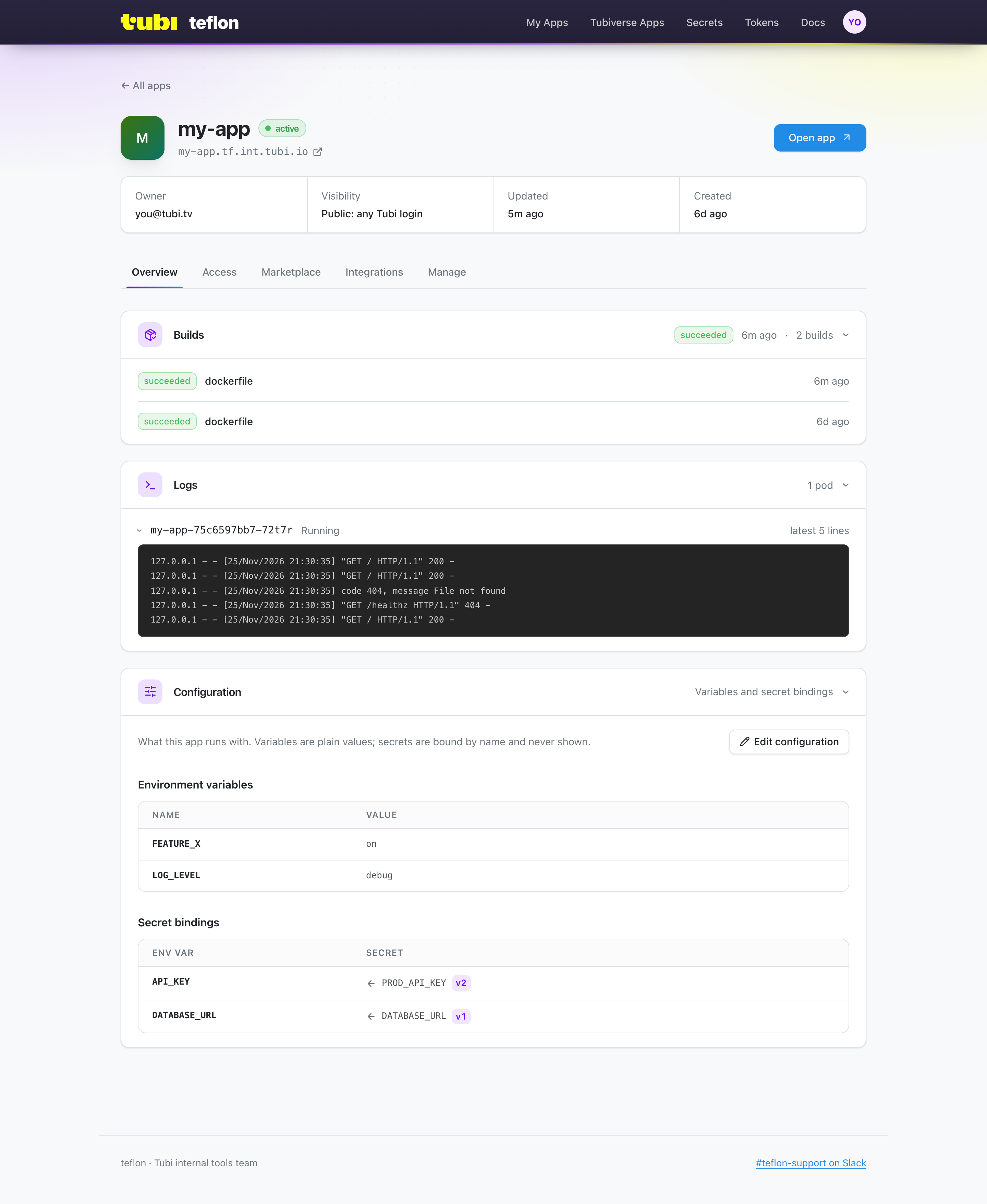
The console does not start deploys. A deploy uploads your source from your machine, so it is a CLI operation by nature.