
Maintenance
Keeping the CLI current
teflon update checks the published version, downloads the binary for your platform, verifies its checksum, and only then replaces the running binary in place.
--force installs whatever the manifest publishes even when that is the version you already have, or an older one - which is how you pick up a rolled-back release.
Updating needs a current login: both the version manifest and the binaries are gated on your stored access token.
You do not usually have to remember this.
Every other command checks for a newer release at most once a day, in the background, and prints a one-line notice to stderr after its own output.
The check can never make a command fail, and every failure mode - offline, logged out, timed out - is silent.
Turn it off with --no-update-check or TEFLON_NO_UPDATE_CHECK=1.
When an app is quarantined
The image an app is serving keeps being scanned after it ships. If a critical vulnerability with a fix available turns up in it, the app is quarantined: it is scaled to zero, visitors see an explanatory offline page instead of the app, and you get one email saying so.
A quarantined app is easy to recognise:
teflon app getshowsSTATUS quarantined, a status reason, and aQUARANTINEDrow listing each CVE, the affected package, and the fixed version.- The console shows a red shield in the My Apps list, and the app's detail page grows a Quarantined card with the same findings and the steps to fix them.
Getting out is the same move as fixing a failed build: update the flagged dependencies to their fixed versions and teflon deploy again.
A successful deploy releases the quarantine immediately; the app also comes back on its own if a later rescan of the same image comes up clean.
Removing an app's volume
A persistent volume is attached at deploy time with teflon deploy --volume-size, and it costs the app its zero-downtime deploys: the disk can only attach to one pod at a time, so teflon switches the app to Recreate deploys and every deploy from then on has a brief gap.
When you no longer need the data, taking the volume away gets the ephemeral filesystem and rolling deploys back.
This permanently deletes everything on the volume.
You are asked to type the application's name to confirm; --force skips that prompt, for scripts.
It only ever touches the volume you mounted on the app: a database's disk is not a volume, and teflon volume never reads, changes, or removes it.
Only teflon db does.
Reasons you would: the app no longer keeps local state, you attached a volume by mistake, or you need zero-downtime deploys back more than you need the disk. Note that a volume is grow-only while it exists, so removing and reattaching is also the only way to end up with a smaller one.
Renaming an app
Only the app's owner can rename it. The selector resolves like everywhere else: name, slug, or uuid.
The service slug and the URL follow the new name, under the same rules a first teflon deploy of that name meets: it must slug to a valid, unreserved name that no other live application holds.
Everything else stays attached - secrets, env vars, the volume, the allow list, admins, and identity federation - and the app is rolled onto the new name without a redeploy.
The old URL stops serving as soon as the rename lands. There is no redirect, so update any bookmarks or links yourself. The command prints the application as it looks under its new name.
Handing an app to someone else
Only the app's owner can hand it over, and only to someone who has signed in to Teflon at least once, whether in the console or with teflon auth login.
If they have not, the command says so, and the fix is to ask them to sign in.
You are asked to type the application's name to confirm; --force skips that prompt, for scripts.
The new owner is the one who can delete the app, rename it, bind secrets to it, and change its admins, because those stay owner-only, and only they can hand it back.
You stay on as an admin, so you can still deploy it and manage its env vars and allow list, and nobody's ability to reach or manage the app changes.
Pass --leave to drop out of it entirely instead: you are then an ordinary user, with no role on the app and, when its allow list is on, no way in.
The new owner can take your admin role away later with teflon app admin remove.
Everything attached to the app stays attached: env vars, the volume, databases, the allow list, admins, webhooks, GitHub Actions grants, and identity federation.
So do the API tokens people minted for it, and so does what you set up: a grant that lets one of your GitHub repositories deploy the app keeps working for the new owner until they revoke it.
Nobody has to accept, so Teflon emails the new owner, with the commands to review who can deploy and call the app: teflon app admin list, teflon webhook list and teflon ci list.
Secrets
Secrets belong to a person, not to the app, so they cannot change hands with it. Instead the transfer copies every secret the app binds into the new owner's account, in the same step, and the app binds the copies: it keeps every value, and nobody has to set a secret again. The app rolls once, onto the same values.
The copies are the new owner's from then on, to rotate with teflon secret set, rebind, or delete; teflon secret list shows them.
A copy keeps your secret's name, unless the new owner already has a secret of that name: then it is numbered, API_KEY_2 (or _3, and so on), and their own API_KEY stays where it was, bound to nothing new.
The command's output and the email Teflon sends the new owner list every copy and the env vars it fills.
Your own secrets are untouched: still yours, and still bound to your other apps. So you still know the values, and if the new owner should be the only one who does, they rotate the credentials themselves.
The copies count against the new owner's limit of 500 secrets, and a transfer that would take them past it is refused with the names of the secrets it would copy; they can delete some of theirs first. A deploy that sets secrets and is still building blocks the transfer, because its secrets would be yours; wait for it to finish.
In the console
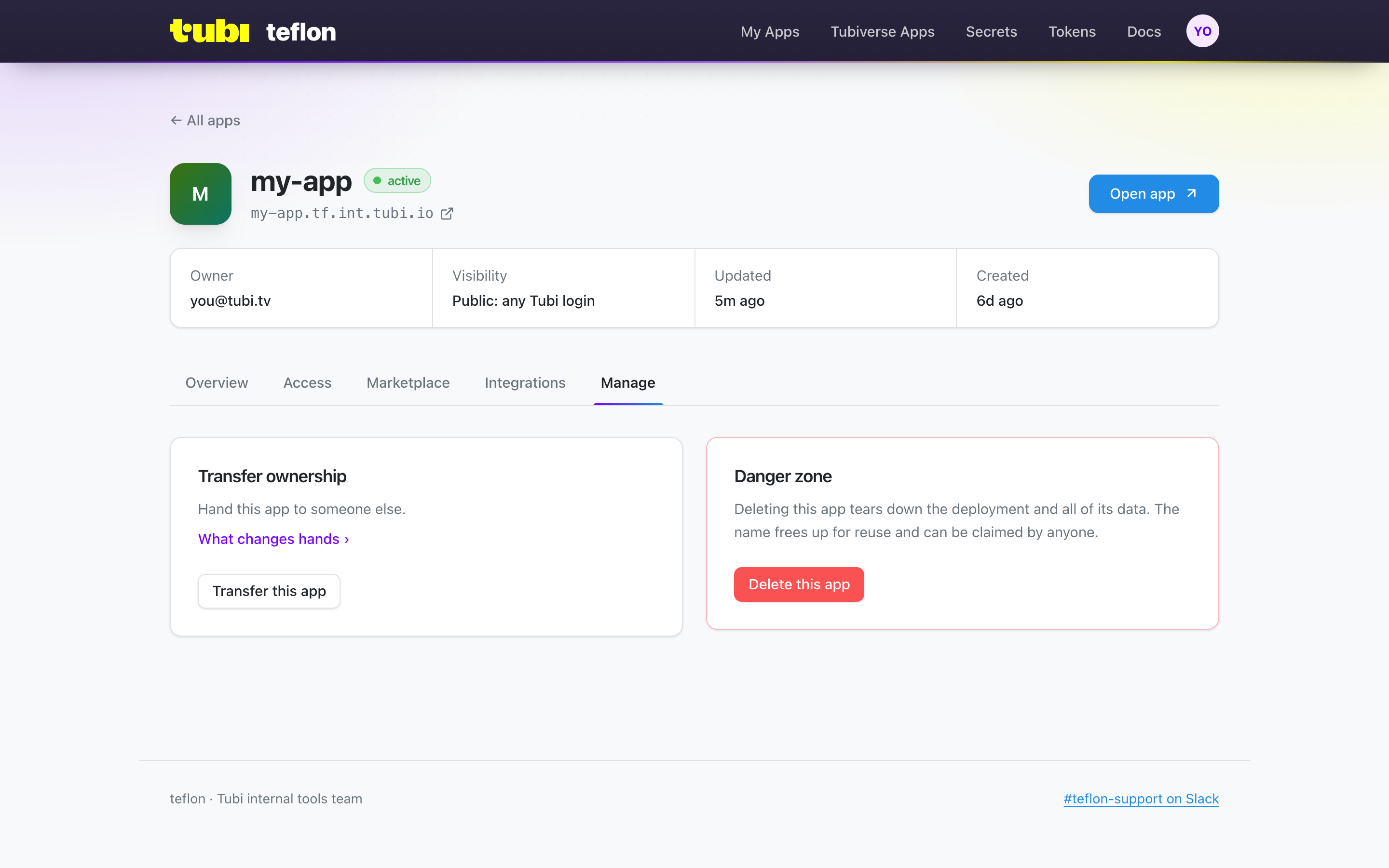
The owner's app detail page has a Transfer ownership card beside the Danger zone, on the Manage tab, with the same choices: the new owner's email, and whether you stay on as an admin. Like the delete, it asks you to confirm in a panel first.
Deleting an app
The selector resolves like everywhere else: name, slug, or uuid.
Delete is soft. The route is removed from the proxy and the workloads are torn down from the cluster, but the record is kept server-side for audit. The command prints the application as it was at the moment of deletion.
The databases the app has are deleted with it, data included. The command says so, and any backup already taken is kept for up to 7 days, but restoring it after the app is deleted needs help from the Teflon engineers (see below for where to ask).
In the console, the Manage tab of the app's detail page has a Danger zone card with a Delete this app button, behind a confirmation panel.
Getting help
Something not behaving the way this guide says? Ask in the teflon support Slack channel.
When you do, the two most useful things to bring are the app's selector and the output of the command that surprised you.
For a failing deploy, the build id from teflon deploy and the output of teflon logs <app> usually answer the question outright.
There is also a channel that needs no Slack at all:
teflon report files a markdown write-up of how a session went straight to the teflon team - the commands run, what worked or failed, and what would have made it easier.
--outcome is success, partial, or failure; --app is optional.
It exists mostly for AI agents, which are asked to file one after every deploy, but a human report is just as welcome.